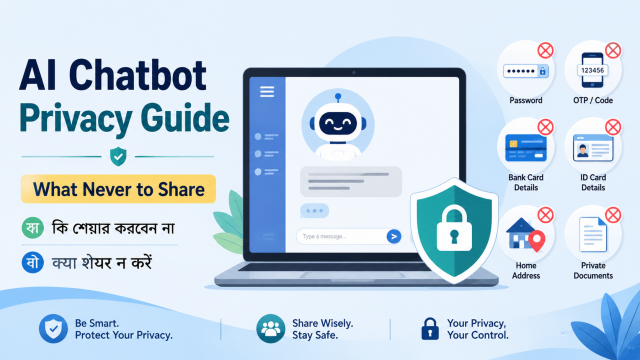
Quick answer: Do not paste passwords, one-time codes, full payment-card details, identity-document numbers, private medical records, confidential work files or another person’s personal information into a general AI chatbot. Share the minimum necessary, replace identities with labels, and check the provider’s current data controls.
Affiliate disclosure: This guide may contain affiliate links. If you buy through them, JoLLy KA Tech may earn a commission at no extra cost to you. Any product suggestion should be based on compatibility, safety, warranty and value—not commission. As an Amazon Associate I earn from qualifying purchases.
সহজ কথা: AI-কে কাজের জন্য যতটুকু দরকার, শুধু ততটুকু তথ্য দিন। सरल बात: पासवर्ड, OTP और पूरे पहचान दस्तावेज़ कभी चैट में न डालें।
Why privacy starts before you press Send
An AI chatbot can help rewrite an email, explain a bill, summarise a document or compare products. The risk begins when the prompt contains more personal information than the task needs. Even when a provider offers privacy controls, a copied secret can still appear in chat history, screenshots, shared links, connected services or a device used by someone else.
The safest habit is data minimisation: share the least information required to get a useful answer.
15 things you should not share
- Passwords, passkeys or recovery codes. A legitimate support process should not need your account password inside a chatbot conversation.
- One-time passwords and verification codes. OTPs are designed for a single authentication step and should not be copied into chat.
- Full debit-card, credit-card or bank-account details. Do not share CVV, PIN, full card number, internet-banking password or UPI PIN.
- API keys, access tokens and private encryption keys. These can allow account access or create charges.
- Full identity-document numbers or clear scans. This includes Aadhaar, PAN, passport, voter ID, driving licence and similar documents unless you are using an authorised service that explicitly requires them—not a general chatbot.
- Private medical reports linked to your identity. Remove name, phone, address, patient ID, QR codes, barcodes and hospital registration numbers before using a tool for general explanation.
- Confidential legal documents. Contracts, notices and case files can contain personal data, strategy and legally privileged information.
- Unpublished company information. Do not paste customer lists, source code, credentials, financial results, internal plans or trade secrets without your organisation’s approved AI policy.
- Children’s personal information. Avoid names, school, routine, precise location, photos, IDs and health details.
- Another person’s private messages. Their message may include information they did not consent to share with an AI service.
- Exact home address and live location. Use a city, district or broad area when precise location is unnecessary.
- Private photos with hidden clues. Images may reveal faces, vehicle numbers, house numbers, documents, screens, reflections or location metadata.
- Biometric information. Avoid fingerprints, face templates, voiceprints or other data used to identify a person.
- Security questions and personal recovery facts. Examples include childhood nickname, first school or other answers used for account recovery.
- Anything you would not want in a screenshot. This simple test catches many unnecessary disclosures.
Use placeholders instead of real data
A chatbot usually does not need the real identity to improve wording or explain a process. Replace details before pasting:
Original:
My name is [full name], account number is [full number], phone is [number],
and the transaction reference is [reference].

Safer version:
Customer: [NAME]
Account: [ACCOUNT ENDING 4821]
Phone: [PHONE REDACTED]
Transaction: [REFERENCE REDACTED]
Problem: Payment is marked successful but the merchant did not receive it.
Keep the real information in your own secure notes. Add it later directly into the official support form or final document.
How to redact a document safely
- Work on a copy. Keep the original unchanged in a secure location.
- Remove visible identifiers. Names, signatures, photos, phone numbers, email, addresses, IDs, QR codes, barcodes, account numbers and reference numbers may identify the person.
- Check headers, footers and filenames. A filename such as “Rina_Passport_1234.pdf” still exposes information.
- Flatten or export carefully. Drawing a black box over text may not remove the underlying selectable text. Use a proper redaction feature or create a clean copy and test whether the hidden text can still be selected or searched.
- Inspect every page. Repeated identifiers can appear on later pages.
- Remove image metadata where appropriate. Photos can contain time, device and location information.
- Ask whether upload is necessary. A typed, anonymised excerpt may be enough.
Understand three different privacy controls
1. Chat history
Deleting or hiding a chat from your sidebar is not always the same as changing how data is retained or used. Read the provider’s explanation of deletion, temporary chats and retention.
2. Model-improvement settings
Some consumer AI services provide a control for whether conversations help improve models. Names and locations of these settings can change. OpenAI currently documents an “Improve the model for everyone” control under Data Controls for signed-in users. Google provides Gemini Apps Activity and a Privacy Hub explaining how prompts, files, connected apps and generated content may be processed.
3. Connected apps and actions
A chatbot connected to email, cloud storage, calendar, browser or another service may access more context when you ask it to perform a task. Review permissions, confirm which account is connected, and remove connections you no longer use.
A five-question check before uploading a file
- Does the chatbot need the whole file, or only one anonymised paragraph?
- Who owns the information, and do I have permission to share it?
- Does the file contain hidden pages, comments, tracked changes or metadata?
- Is this a personal consumer account or an organisation-approved workspace?
- What would happen if the file were accidentally shared or seen on this device?
Safer ways to use AI for common tasks
Rewriting a complaint email
Paste only the problem, dates and desired resolution. Replace the order number and personal details. Add them manually in the official email after reviewing the draft.
Understanding a medical term
Type the medical term and a general, anonymous description. Do not upload a full identifiable report unless you have a clear reason, suitable consent and an approved service. Ask a qualified clinician to interpret results and make decisions.
Explaining a bank message
Copy the wording but remove links, account digits, transaction references and balances. Never share OTP, UPI PIN, CVV or internet-banking password.
Reviewing a work document
Use your employer’s approved tools and policy. If none exists, ask before uploading internal information. A free consumer chatbot should not automatically be treated as a confidential workplace system.
Getting help with a photo
Crop the image to the necessary object, blur faces and identifying details, and check mirrors, backgrounds, computer screens and documents before upload.
Account and device safety checklist
- Use a unique password and available multi-factor authentication.
- Install AI apps only from the official app store or provider website.
- Check the developer name; imitation apps can use similar icons and names.
- Review active sessions and sign out from shared or old devices.
- Do not leave sensitive chats open on a family or office computer.
- Be cautious with public share links; anyone with the link may be able to view the shared content depending on the service.
- Review connected apps and revoke permissions you no longer need.
- Keep the browser, operating system and official app updated.
- Report unexpected login alerts or unknown activity through the provider’s official support route.
What to do after sharing something sensitive by mistake
- Stop sharing more information.
- Delete or remove the chat or uploaded file using the service’s available controls.
- If a password, API key or recovery code was exposed, revoke or change it immediately.
- If payment information was exposed, contact the bank or card issuer through an official number and monitor transactions.
- If an identity document was exposed, follow the relevant issuing authority’s guidance and watch for misuse.
- Review shared links, connected apps, account sessions and recent activity.
- Keep screenshots or records needed for a support or fraud report—but do not circulate the sensitive content again.
Deleting a chat does not reverse every possible consequence of a compromised secret. Changing the credential or contacting the responsible institution is often the critical step.
Frequently asked questions
Is it safe to share only the last four digits?
Last four digits are usually less sensitive than the full number, but combine them only with the minimum other information needed. Avoid sharing them when they do not help the task.
Can I upload an Aadhaar or PAN card for AI editing?
A general chatbot usually does not need a full identity document. Use an authorised workflow for official tasks. For design practice, use a fictional sample that cannot be mistaken for a real document.
Does incognito mode make an AI chat private?
Incognito or private browsing mainly limits what the browser stores locally. It does not automatically change the AI provider’s account, server, retention or model-improvement settings.
Can I trust an AI browser extension?
Review the developer, permissions, privacy policy, update history and necessity. An extension that can read every webpage may also see sensitive page content. Prefer official, limited-permission tools.
Should I delete all AI chat history?
That is a personal choice. More important is understanding the service’s controls, removing sensitive chats, securing the account and avoiding unnecessary disclosure in future prompts.
Official references
- OpenAI Data Controls FAQ
- OpenAI consumer privacy controls
- Google Gemini Apps Privacy Hub
- Google: Manage and delete Gemini Apps activity
- Anthropic privacy information
Related JoLLy KA Tech guide: create a privacy-aware QR contact card for a lost gadget.
Last reviewed: 27 July 2026. AI tools, menus, limits and privacy settings can change. Check the provider’s current help pages before relying on a feature or setting.