Quick answer: Power the device off, unplug it, remove loose dust with a clean soft microfiber cloth, and follow the manufacturer’s cleaning instructions. Never spray liquid directly onto a screen, push moisture into openings or assume one chemical is safe for every coating.
Affiliate disclosure: This article may contain affiliate links. If you buy through them, JoLLy KA Tech may earn a commission at no extra cost to you. Product suggestions are based on suitability, safety, warranty and value—not commission. As an Amazon Associate I earn from qualifying purchases.
সহজ কথায়: ডিভাইস বন্ধ ও আনপ্লাগ করে নরম পরিষ্কার মাইক্রোফাইবার কাপড় ব্যবহার করুন; স্ক্রিনে সরাসরি তরল স্প্রে করবেন না।
आसान भाषा में: डिवाइस बंद और अनप्लग करके साफ मुलायम माइक्रोफाइबर कपड़ा उपयोग करें; स्क्रीन पर सीधे तरल स्प्रे न करें।
Project time: 10 minutes to assemble, 5 minutes per device • Difficulty: Beginner • Best for: Phones, tablets, laptops, monitors and TVs
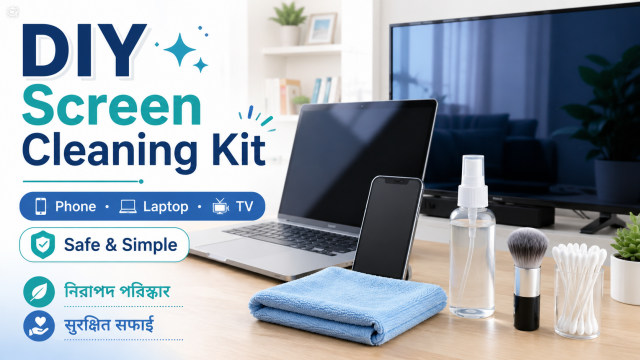
What goes in the kit
- Two clean, soft microfiber cloths stored in a sealed pouch
- A small soft brush intended for electronics or camera equipment
- Distilled water only when the manufacturer permits a slightly damp cloth
- Manufacturer-approved screen cleaner when specifically required
- A small label: “Power off—spray cloth, never screen”
- Optional disposable gloves for handling very dirty shared devices
Do not use abrasive pads, paper towels, window cleaner, bleach, ammonia, unknown alcohol mixtures or compressed air unless the manufacturer specifically says the product and method are safe for that exact device.
Why one cleaning recipe does not fit every screen
Phones, televisions, monitors and laptops may use different anti-reflective, oleophobic or textured coatings. Some manufacturers allow specific alcohol wipes on certain hard non-porous surfaces, while other displays require only a dry or lightly dampened cloth. The exact manual takes priority over a general internet recipe.
The safe basic routine
- Turn the device off, disconnect power and let it cool.
- Remove the case or cover only if its instructions allow it.
- Use the first dry microfiber cloth to lift loose dust with light strokes.
- If marks remain and the manufacturer permits moisture, lightly dampen a separate cloth. It should not drip.
- Wipe gently without pressing hard on pixels or panel edges.
- Use the dry cloth to remove remaining moisture.
- Wait until the surface and ports are completely dry before reconnecting power.
Clean the cloth, not only the screen
A microfiber cloth can hold grit that scratches a display. Wash it separately according to its care instructions, avoid fabric softener, and store it in a clean pouch. Retire a cloth that has grease, sand, hardened dirt or rough edges.
Phone and tablet details
- Do not push moisture into charging ports, speakers or buttons.
- Remove grit from a case before reinstalling it.
- Avoid cleaning while the device is charging.
- If the screen protector is lifting, follow the protector maker’s cleaning guidance.
Laptop and monitor details
- Support the display from behind only if the manufacturer permits; do not twist the hinge.
- Keep liquid away from the keyboard and ventilation openings.
- Use light pressure on thin panels.
- Clean the desk first so dust does not immediately return.
TV details
- Let a warm TV cool before cleaning.
- Do not reach from an unstable stool.
- Ask another adult to steady a large freestanding TV if movement is possible.
- Never spray around the lower bezel where liquid can enter the panel.
Affiliate-friendly products
Relevant products include high-quality microfiber cloths, a soft electronics brush, manufacturer-approved screen cleaner and a protective storage pouch. Do not promote a cleaner with universal “safe for every screen” claims unless its documented compatibility truly supports that statement.
Stop and seek service when
- Liquid entered the device
- The screen is cracked, separating or bulging
- Dark patches grow when lightly touched
- The device smells unusual or becomes hot
- A coating appears to peel after cleaning
Frequently asked questions
Can I use hand sanitiser on a phone screen?
Do not assume it is suitable. Sanitiser may contain fragrances, gels and additives. Follow the phone manufacturer’s approved cleaning methods.
Can I use tissue paper?
Paper products can be rough and may leave fibres. A clean soft microfiber cloth is generally the safer starting point when the manufacturer allows it.
Is distilled water always safe?
No. Some devices should be cleaned dry, and moisture can enter openings. Use it only when the manufacturer allows a lightly dampened cloth.
How often should I clean screens?
Clean when needed rather than polishing constantly. Frequent heavy rubbing can add wear, especially when dust has not been removed first.
Sources and further reading
- Apple Support: How to clean Apple products
- Apple Support: Clean a Mac display
- Microsoft Support: Clean and care for Surface
Important: Device designs, app menus and manufacturer instructions can change. Check the manual for your exact device before using cleaners, stands, chargers, storage products or accessories.