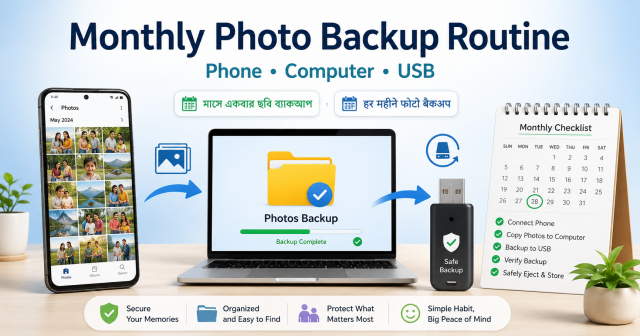
Quick answer: A backup is useful only when you can open the copied files and recover them. Each month, confirm cloud backup status, copy important photos to a computer or external drive, open samples from the copy, and keep at least one copy separate from the phone.
Affiliate disclosure: This article may contain affiliate links. If you buy through them, JoLLy KA Tech may earn a commission at no extra cost to you. Product suggestions are based on suitability, safety, warranty and value—not commission. As an Amazon Associate I earn from qualifying purchases.
সহজ কথায়: শুধু “ব্যাকআপ হয়েছে” লেখা দেখলেই হবে না—অন্য ডিভাইস বা ড্রাইভ থেকে কয়েকটি ছবি খুলে যাচাই করুন।
आसान भाषा में: सिर्फ “बैकअप पूरा” दिखना काफी नहीं है—दूसरे डिवाइस या ड्राइव से कुछ फोटो खोलकर जांचें।
Project time: 20–60 minutes each month • Difficulty: Beginner • Best for: Family photos, videos, receipts and scanned records
What counts as a backup
A second folder on the same phone is not a strong backup because one loss, reset or hardware failure can affect both. A practical home routine uses the phone plus a verified cloud account or computer copy, and a separate external drive for important files. Your exact plan depends on privacy needs, storage size and internet access.
Before the first backup day
- Confirm the correct Google, Apple, Microsoft or other trusted account is signed in.
- Write down where account recovery information is securely stored.
- Choose a computer folder such as Pictures/Family Backup.
- Prepare a reliable external drive or pen drive with enough free space.
- Decide which chat-app folders, screenshots and downloads are worth keeping.
Do not delete the phone copy until you have verified the backup. Cloud sync and backup are not always the same: deleting in one place may also remove the cloud copy.
The monthly seven-step routine
- Connect to trusted Wi-Fi and power if a large cloud backup is pending.
- Open the photo app and check backup status and the account name.
- Look for items that failed to upload or are stored in excluded folders.
- Connect the phone to a computer or use the official transfer method. Copy the month’s important photos and videos.
- Create a folder named by year and month, such as 2026/2026-07.
- Copy the organised folder to an external drive. Eject the drive safely.
- Open at least five recent photos and one video from each destination before marking the month complete.
A folder system non-technical users can maintain
- 2026-01 Family
- 2026-02 Documents
- 2026-03 Festival
- 2026-04 School
- 2026-05 Travel
Keep folder names short and consistent. Do not rename thousands of individual files unless there is a clear benefit; the date and folder context are often enough.
What to do with duplicates
Automatic duplicate tools can make mistakes when edited photos, burst shots or messaging-app copies look similar. Review before deleting. Start with obvious screenshots, failed downloads and repeated forwarded images rather than irreplaceable camera originals.
Protect private scans and identity documents
- Store only what you genuinely need.
- Use device encryption and a secure account password.
- Do not leave an unencrypted drive connected to a shared computer.
- Avoid filenames containing complete identity numbers or passwords.
- Before selling or recycling a drive, follow secure erasure guidance appropriate to the device.
Affiliate-friendly product choices
Relevant products include an external SSD or hard drive, dual-connector phone drive, card reader, storage case and short data cable. Explain compatibility, connector, capacity, warranty and backup limitations. A fast drive does not help if the cable or phone port supports only slower transfer.
Create a visible completion record
Keep a paper checklist near the computer: cloud checked, computer copy checked, external copy checked, sample files opened. This simple evidence is more useful than trusting memory.
When to ask for help
Get help before deleting anything when the phone is failing, a drive makes unusual noises, files show errors, encryption keys are missing or a cloud account appears locked. Repeated attempts can sometimes make recovery harder.
Frequently asked questions
Is cloud storage alone enough?
It protects against some device failures, but account problems, sync mistakes and accidental deletion can still matter. Important files benefit from another separate copy.
Can I use a pen drive for backup?
Yes for an additional copy, but small flash drives are easy to lose and can fail. Keep another copy and verify the files regularly.
Why are some phone folders missing on the computer?
App permissions, cloud-only items, device mode and manufacturer restrictions can affect visibility. Use official transfer instructions for the exact phone.
How often should I back up?
Monthly is a simple baseline. Back up sooner after important events, document scanning or irreplaceable recordings.
Sources and further reading
- Google Photos Help: Check your backup
- Google Photos Help: Back up photos and videos
- CISA: Protect data stored on your devices
- JoLLy KA Tech: Pen drive buying guide
Important: Device designs, app menus and manufacturer instructions can change. Check the manual for your exact device before using cleaners, stands, chargers, storage products or accessories.