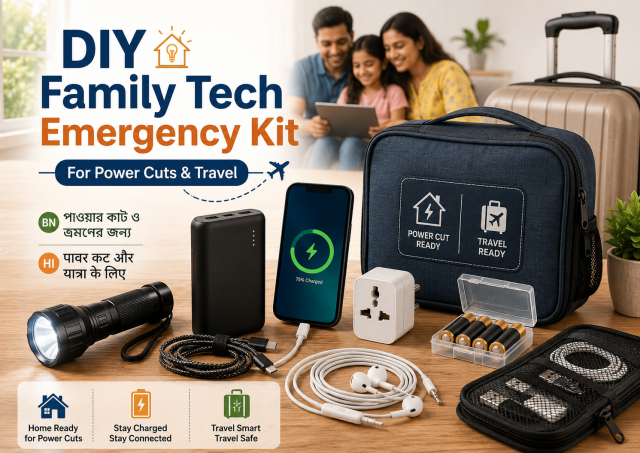
Quick answer: Keep a small labelled pouch with one tested power bank, compatible cables, a basic flashlight, printed emergency contacts and device information. Check it monthly. The kit supports short disruptions; it is not a substitute for medical, disaster or professional electrical planning.
Affiliate disclosure: This article may contain affiliate links. If you buy through them, JoLLy KA Tech may earn a commission at no extra cost to you. Product suggestions are based on suitability, safety, warranty and value—not commission. As an Amazon Associate I earn from qualifying purchases.
সহজ কথায়: একটি ছোট ব্যাগে পরীক্ষিত পাওয়ার ব্যাংক, দরকারি কেবল, টর্চ ও ছাপানো জরুরি নম্বর রাখুন এবং প্রতি মাসে পরীক্ষা করুন।
आसान भाषा में: एक छोटे बैग में जांचा हुआ पावर बैंक, जरूरी केबल, टॉर्च और छपे हुए आपातकालीन नंबर रखें और हर महीने जांचें।
Project time: 30–45 minutes • Difficulty: Beginner • Best for: Families, older users, short trips and seasonal power cuts
Start with the problem, not the shopping list
Think about the most likely situations in your home: a short power cut, a lost charging cable, a phone with low battery during travel, a router that needs its original adapter, or an older family member who cannot find a contact number. The kit should remain small enough that everyone knows where it is.
Core items
- One reputable power bank suitable for the family’s phones
- One short tested cable for each connector type actually used
- A wall charger with verified compatibility and clear labelling
- A basic LED flashlight with manufacturer-recommended batteries
- A printed card with emergency contacts and important service numbers
- A small paper showing each family phone model and charging connector
- A zip pouch or open organiser that keeps items dry and visible
Do not store a swollen, punctured, recalled, wet or unusually hot battery. Do not keep a charging power bank under bedding, inside a sealed container or in a hot parked vehicle.
Label for non-technical users
Use large text and simple colours. For example: “BLUE CABLE—MOTHER PHONE,” “BLACK CABLE—POWER BANK,” and “ROUTER ADAPTER—DO NOT MIX.” Put the same colour mark near the device port or on its storage pouch without covering labels or vents.
Add a printed recovery card
- Emergency contact names and phone numbers
- Internet provider customer-care number from the official bill or website
- Phone brand service page or warranty reference
- A reminder: never share an OTP, screen-lock PIN or account password
- A note showing where account recovery details are securely kept—not the passwords themselves
Monthly test routine
- Check the power bank for swelling, cracks, leakage, unusual smell or excessive heat.
- Charge it according to the manufacturer’s instructions and verify that it can charge one family phone.
- Test every cable by charging for a few minutes while supervised.
- Switch on the flashlight and inspect stored batteries for leakage.
- Confirm printed contact numbers are still correct.
- Return every item to the same labelled position.
Travel version
For travel, carry the power bank in hand baggage according to airline rules and current security instructions. Protect ports from metal objects, and do not carry a damaged battery. Rules can change, so check the airline and airport guidance before departure.
What not to add
- Unknown loose lithium cells
- Unlabelled adapters that fit several devices
- A cheap multi-plug with unclear rating
- Password lists, PINs or recovery codes in plain view
- Leaking disposable batteries
- Medicine or medical equipment instructions mixed without professional advice
Affiliate opportunities with honest limits
Relevant products include a compact power bank, certified charger, short cables, cable pouch, LED flashlight, battery case and printed label set. Avoid promising a number of phone charges without explaining conversion loss, phone use and battery condition.
Connect this kit to a wider household plan
Keep a separate non-tech emergency plan for water, lighting, medicine, communication and local hazards. The technology pouch is only one small part. Everyone should know its location and the safest way to use it.
Frequently asked questions
How large should the power bank be?
Choose capacity based on the phones and realistic need, then consider weight, ports, charging speed, warranty and safe transport. Larger is not always more practical.
Can I keep the power bank fully charged all year?
Follow the manufacturer’s storage guidance. Check it regularly rather than ignoring it for months, and keep it in a cool, dry place.
Should I include a spare SIM card?
Only when it is lawful, active, properly stored and genuinely useful. A spare SIM may expire or require identity and plan management.
Can the kit power a Wi-Fi router?
Only with a product specifically compatible with the router’s voltage, connector and power requirement. Do not improvise wiring.
Sources and further reading
- Apple: Important safety information for iPhone
- JoLLy KA Tech: Why a 10,000mAh power bank may not charge twice
- EPA: Electronics donation and recycling
Important: Device designs, app menus and manufacturer instructions can change. Check the manual for your exact device before using cleaners, stands, chargers, storage products or accessories.