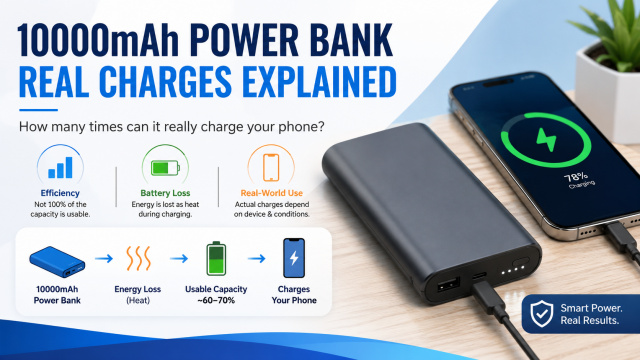
Quick answer: Dividing 10,000 by 5,000 gives two, but that calculation compares two different battery systems too simply. The power bank converts energy before sending it to the phone, the phone converts it again while charging, the cable uses a little energy and the phone may be running during the process.
Affiliate disclosure: Some links in this guide may be paid affiliate links.
If you buy through them, JoLLy KA Tech may earn a commission at no extra cost to you.
Recommendations should be based on suitability, safety, warranty and value—not commission.
As an Amazon Associate I earn from qualifying purchases.
What the 10,000mAh number actually tells you
The capacity printed on a power bank describes the battery cells inside it under specified conditions. Your phone receives power through a USB output at a different operating voltage. The power bank must convert the stored energy before sending it through the cable.
No conversion is perfectly lossless. The phone also uses energy for its display, mobile network, Wi-Fi, apps and background tasks while it is charging. Therefore, the number of practical phone charges is lower than the simple division suggests.
A non-technical example
Imagine storing water in a large tank and moving it into a smaller tank through a pump and pipe. Some energy is used by the pump, and the smaller tank may be supplying taps at the same time. The printed capacities still matter, but they do not tell the complete story by themselves.
What changes the real number of charges?
- Phone use: Gaming, video, hotspot use and navigation consume power while charging.
- Charging speed: Faster charging can create more heat, and heat can reduce efficiency.
- Cable quality: A damaged or unsuitable cable can waste power and slow charging.
- Power bank condition: Battery capacity declines with age and repeated use.
- Temperature: Very hot or very cold conditions can affect charging behaviour.
- Standby use: The power bank’s control electronics and indicators use a small amount of energy.
Choose a power bank by use, not only capacity
| Your need | What to prioritise |
|---|---|
| Emergency top-up | Compact size, reliable output, one suitable port |
| One full day away from a socket | Comfortable capacity, fast output compatible with your phone |
| Two phones | Multiple ports and enough total output when both ports are used |
| Tablet or USB-C laptop | Clearly stated USB-C output power and device compatibility |
| Frequent travel | Weight, size, safety information, warranty and airline rules for the trip |
Six specifications worth checking
- USB-C input: A faster input can reduce the time needed to recharge the power bank.
- USB-C output: Confirm that the USB-C port is an output, not input-only.
- Output wattage: Match it to the phone, tablet or laptop you plan to charge.
- Charging compatibility: Check the protocols supported by both the device and power bank.
- Total output: Some power banks reduce speed when two devices are connected.
- Warranty and seller: Battery products should have clear support and return information.
Do not buy by these claims alone
- “Charges every phone four times” without naming a test phone or conditions.
- “Super fast” without an output specification.
- A huge capacity in an unusually small and light body.
- Product images that hide the label or port specifications.
- Only star ratings, without reading recent reviews for the exact model.
A simple real-life capacity test
- Fully charge the power bank with its recommended charger.
- Let both the phone and power bank return to room temperature.
- Start the phone at a recorded battery percentage.
- Use the same cable and keep phone usage similar throughout the test.
- Record each charging session until the power bank stops supplying power.
- Repeat once on another day before drawing a conclusion.
Power-bank LED indicators are often approximate. Your result is useful as a practical personal test, not as a laboratory measurement.
When should you stop using a power bank?
Stop using it if the case swells, cracks, leaks, smells unusual, becomes excessively hot, or has a loose or damaged port. Do not leave a battery pack in a hot vehicle or cover it while charging. Follow the manufacturer’s safety and disposal instructions.
Frequently asked questions
Is a larger-capacity power bank always better?
No. Larger models are usually heavier and take longer to recharge. Choose enough capacity for your normal day rather than the largest number available.
Can a power bank charge a laptop?
Only if the power bank’s USB-C output and charging protocol meet the laptop’s requirements. Connector shape alone is not enough.
Why does my power bank charge one phone faster than another?
The phones may support different charging standards or power levels. The cable and the port used can also change the result.
Should I keep a power bank at 100% all the time?
Follow the manufacturer’s storage guidance. For long-term storage, check it periodically and keep it away from excessive heat.