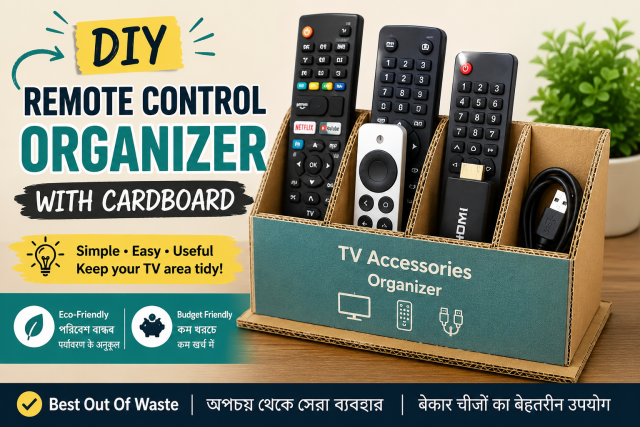
Quick answer: An open divided holder gives each remote a fixed return place. Make compartments wide enough for easy removal, add a non-slip base, and keep batteries and small accessories away from young children. Do not place streaming boxes or active chargers inside the organiser.
Affiliate disclosure: This article may contain affiliate links. If you buy through them, JoLLy KA Tech may earn a commission at no extra cost to you. Product suggestions are based on suitability, safety, warranty and value—not commission. As an Amazon Associate I earn from qualifying purchases.
সহজ কথায়: প্রতিটি রিমোটের জন্য আলাদা খোলা ঘর বানান, নিচে অ্যান্টি-স্লিপ দিন এবং ছোট ব্যাটারি শিশুদের নাগালের বাইরে রাখুন।
आसान भाषा में: हर रिमोट के लिए अलग खुला खांचा बनाएं, नीचे एंटी-स्लिप लगाएं और छोटी बैटरियां बच्चों की पहुंच से दूर रखें।
Project time: 25–45 minutes • Difficulty: Beginner • Best for: TV rooms, shared homes and older family members
Why a fixed home works
Most remote-control frustration is a return-location problem. A visible holder beside the normal seating area is easier to remember than a drawer. Separate compartments also prevent one remote from hiding below another.
Materials
- Clean corrugated cardboard or a sturdy open food carton
- Ruler, pencil and scissors
- Strong paper tape
- Three to five small cardboard dividers
- Non-slip shelf liner or rubber pads
- Large labels or simple coloured stickers
Measure the actual remotes
Line up the remotes and measure the widest one while allowing finger space on both sides. Keep compartments shallow enough that the top third of each remote remains visible. A remote should lift out without pulling the whole holder.
Build the organiser
- Cut a rectangular base wider than all planned compartments.
- Create a low front wall and a slightly higher back wall. Avoid very tall sides that hide the remotes.
- Tape the outer walls to the base from both inside and outside.
- Add dividers and label each slot: TV, SET-TOP BOX, STREAMING, SOUND.
- Add anti-slip material under the base.
- Place the holder where it cannot fall from a narrow armrest or block a speaker, ventilation opening or screen sensor.
Coin-cell and small batteries can cause severe injury if swallowed. Store spare batteries securely, follow product instructions and keep them away from children.
Make it senior-friendly
- Use high-contrast labels with large text.
- Add a matching coloured dot to the remote and its slot.
- Keep the most-used remote in the first slot.
- Do not stack instruction cards in front of the controls.
- Write one simple note: “Return remote here after use.”
Where to keep streaming boxes and chargers
Streaming devices, set-top boxes and chargers need ventilation and should stay where the manufacturer intended. The cardboard organiser is only for inactive hand-held accessories. Do not place a hot remote with leaking batteries into the holder.
Add a small troubleshooting pocket
Attach a flat side pocket for a paper card listing the correct TV input, internet provider number and battery type. Do not keep passwords, payment PINs or account recovery codes there.
Affiliate opportunities
Natural products include a washable remote holder, sofa-arm organiser, rechargeable batteries with a compatible charger, battery tester or label maker. Explain battery chemistry and device compatibility; do not mix old and new batteries or different battery types in the same device unless the manufacturer explicitly allows it.
Monthly maintenance
- Remove dust with remotes taken out.
- Check for battery leakage and sticky buttons.
- Replace torn labels.
- Confirm every remote still has a purpose.
- Recycle unwanted electronics and batteries through appropriate local channels.
Frequently asked questions
Can I attach the holder to a wall?
Use only a mounting method suitable for the wall and the holder’s weight. A lightweight tabletop holder is simpler and avoids falling near people or a TV.
Can I store spare batteries in the organiser?
It is better to keep batteries in their original packaging or a secure battery case away from children, heat and metal objects.
Will cardboard block remote signals?
The holder is for storage. Remove the remote for use. Do not cover the TV’s infrared sensor or place the holder directly in front of it.
Can I keep the streaming stick remote and TV remote together?
Yes, in separate labelled slots. This helps family members identify which remote controls which device.
Sources and further reading
- Apple TV 4K safety information
- EPA: Electronics donation and recycling
- JoLLy KA Tech: Smart TV buying guide
Important: Device designs, app menus and manufacturer instructions can change. Check the manual for your exact device before using cleaners, stands, chargers, storage products or accessories.