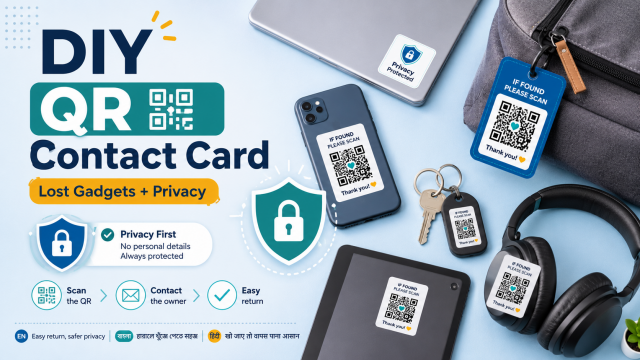
Quick answer: Create a QR code that contains only a dedicated contact method or a simple return webpage, then add a readable text fallback. Do not encode your home address, passwords, identity numbers or financial details. Anyone can copy a visible QR code, so share the minimum information needed.
Affiliate disclosure: This article may contain affiliate links. If you buy through them, JoLLy KA Tech may earn a commission at no extra cost to you. Product suggestions are based on suitability, safety, warranty and value—not commission. As an Amazon Associate I earn from qualifying purchases.
সহজ কথায়: QR কোডে শুধু প্রয়োজনীয় যোগাযোগের তথ্য দিন; বাড়ির ঠিকানা, পাসওয়ার্ড, পরিচয় নম্বর বা আর্থিক তথ্য দেবেন না।
आसान भाषा में: QR कोड में केवल जरूरी संपर्क जानकारी रखें; घर का पता, पासवर्ड, पहचान नंबर या वित्तीय जानकारी न दें।
Project time: 15–30 minutes • Difficulty: Beginner • Best for: Laptop bags, camera pouches, chargers and family gadget cases
Choose the safest contact method
A dedicated email address or secondary phone number can reduce exposure compared with printing your main personal details. For a child’s or older person’s device, a trusted family contact may be more appropriate. Consider how the information could be misused before making the label public.
What the QR code can contain
- A short message: “Found this item? Please email…”
- A dedicated contact email address
- A phone number that can receive calls without revealing extra account data
- A simple webpage you control with limited return instructions
- An item code such as JKT-BAG-04 that helps you identify the object
What not to include
- Home address or live location
- Screen-lock PIN, password or recovery code
- Aadhaar, PAN, passport or other identity numbers
- Bank, UPI or card information
- A child’s full school details or daily routine
- A link that automatically logs into an account
A QR code hides the destination from human eyes until it is scanned. Treat unexpected QR codes like unexpected links, and teach family members to preview the destination before opening it.
Build the card
- Decide the minimum contact message. Write it in plain text first.
- Use a reputable QR generator that can encode text or a URL without requiring unnecessary personal information.
- Generate the code and save a high-quality image.
- Place the code on a simple card with a clear title: “FOUND THIS ITEM?”
- Add a readable fallback email or phone number below it. Do not rely on QR alone.
- Print two copies and cover them with transparent tape or use a waterproof label sleeve.
- Attach the label to a bag or case, not over ventilation, serial labels, cameras or antennas.
Test before using
- Scan with at least two different phones.
- Test from normal viewing distance and indoor light.
- Confirm the preview shows the intended text or domain.
- Check that the contact method works without exposing private account information.
- Test again after laminating or covering with tape because glare can affect scanning.
A safer message example
“Thank you for finding this item. Please email return.jkt@example.com and mention item code BAG-04. Do not send photos of identity documents or payment details.” Replace the example with a contact method you control.
Avoid payment and verification scams
A genuine finder does not need your OTP, account password or remote-access app. If someone demands money, sends a new QR code for “verification,” or asks you to log in through an unfamiliar link, stop and verify independently.
Affiliate opportunities
Relevant products include waterproof labels, luggage tags, clear badge holders, compact label printers and privacy-focused Bluetooth trackers. Explain subscription, phone compatibility, battery replacement, network coverage and anti-stalking protections before recommending a tracker.
Review the card every six months
- Confirm the email or number still works.
- Remove cards from sold or donated items.
- Replace faded labels.
- Change the item code if it appeared publicly online.
- Review whether the card now reveals more information than necessary.
Frequently asked questions
Can I put a QR code on my phone itself?
A label on the case may help if the phone is powered off, but it can also reveal contact information publicly. Use minimal details and avoid covering sensors or regulatory labels.
Should the QR code open WhatsApp?
It can, but it may reveal your main number and profile details. A dedicated email or limited webpage may offer more privacy.
Can I encode my address for easy return?
It is safer not to publish a home address on a portable item. Arrange a public meeting point, courier process or other safe return method after contact.
Are QR codes themselves dangerous?
The printed pattern is not automatically harmful, but it can direct people to phishing or malware sites. Preview the destination and avoid entering sensitive data after an unexpected scan.
Sources and further reading
- FTC: Scammers hide harmful links in QR codes
- FTC: Protect yourself from phishing scams
- EPA: Electronics donation and recycling
Important: Device designs, app menus and manufacturer instructions can change. Check the manual for your exact device before using cleaners, stands, chargers, storage products or accessories.