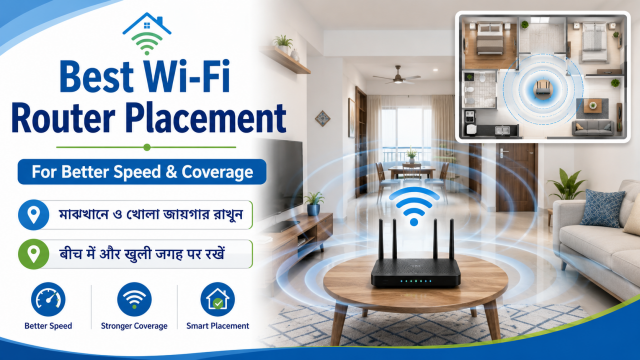
Quick answer: Before buying a new router, move the existing router into the open, raise it from the floor and place it as centrally as the internet cable allows. Then test the same three locations with the same phone.
Affiliate disclosure: Some links in this guide may be paid affiliate links.
If you buy through them, JoLLy KA Tech may earn a commission at no extra cost to you.
Recommendations should be based on suitability, safety, warranty and value—not commission.
As an Amazon Associate I earn from qualifying purchases.
Why placement often matters more than price
Wi-Fi is a radio signal. Walls, floors, metal cabinets, mirrors, appliances and distance can weaken it. A powerful router hidden behind a television or inside a cupboard may perform worse than a basic router placed well.
Google’s Wi-Fi placement guidance recommends an open, central location and, where possible, positioning the router off the ground at about eye level.
The 10-minute placement test
Step 1: Choose three test spots
- Near the router.
- The room where Wi-Fi is normally slow.
- The farthest room where you still need a usable connection.
Step 2: Record a baseline
Use the same phone and the same speed-test service. Test at roughly the same time. Record download speed, upload speed and whether a video call or video plays reliably.
Step 3: Move the router
Move it higher and into the open. Try a central shelf instead of the floor, a closed cabinet or a corner behind the television. Keep the router stable, dry and well ventilated.
Step 4: Repeat the same test
Return to the same three spots and repeat. One test can vary, so perform two or three checks before deciding.
Good and bad locations
| Better location | Usually worse location |
|---|---|
| Open shelf | Closed wooden or metal cabinet |
| Central room | Extreme corner of the home |
| Raised from the floor | On the floor behind furniture |
| Away from large metal objects | Beside a refrigerator or metal rack |
| Clear space around antennas | Covered by books, cloth or decorations |
| Near the rooms that need Wi-Fi | Separated by several thick walls |
2.4GHz and 5GHz without technical confusion
2.4GHz usually reaches farther and passes through walls more easily, but it may be slower and more crowded.
5GHz can be faster at shorter distances, but walls and distance affect it more.
Many modern routers use one Wi-Fi name and choose a band automatically. If your router shows separate names, test both in the problem room rather than assuming the faster-sounding option is always better.
When a mesh system may help
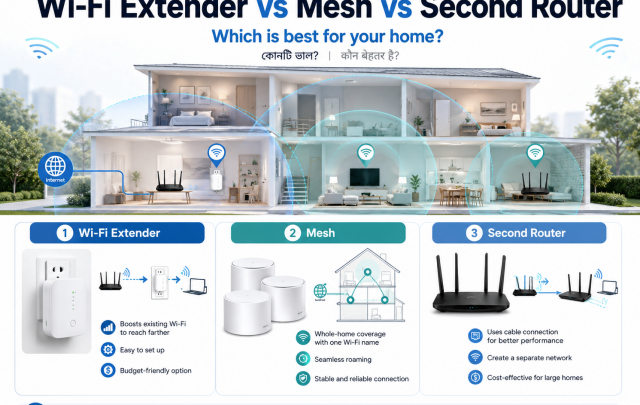
Mesh Wi-Fi can help a larger or multi-floor home where one router cannot reach important rooms. It is not the first solution for every home. First improve placement, update the router, check cables and test whether the problem is actually the internet connection from the provider.
How to separate an internet problem from a Wi-Fi problem
- If every device is slow even beside the router, the internet plan, provider, modem or router may be the issue.
- If speed is good near the router but poor in one room, placement, distance or walls are likely involved.
- If only one phone is slow, check that phone before replacing the router.
- If the problem appears only at busy hours, repeat tests at different times and contact the provider with records.
What to check before buying a new router
- Size and construction of the home.
- Number of floors.
- Speed of the internet plan.
- Number of phones, televisions, cameras and computers.
- Need for Ethernet ports.
- Availability of firmware updates and local support.
- Whether you need one router or a mesh system.
Frequently asked questions
Should the antennas point in the same direction?
Follow the router manufacturer’s guide. For routers with adjustable external antennas, trying different orientations may help, but placement of the whole router usually has a larger effect.
Can I keep the router inside a cupboard?
It may work, but the cupboard can weaken the signal and trap heat. An open shelf is generally better.
Will a Wi-Fi extender always fix a dead zone?
No. An extender also needs a good connection to the main router. Placing it inside the dead zone can repeat a weak signal.
Does a more expensive router increase my internet plan speed?
No. A router can improve local Wi-Fi coverage or capacity, but it cannot increase the speed purchased from the internet provider.