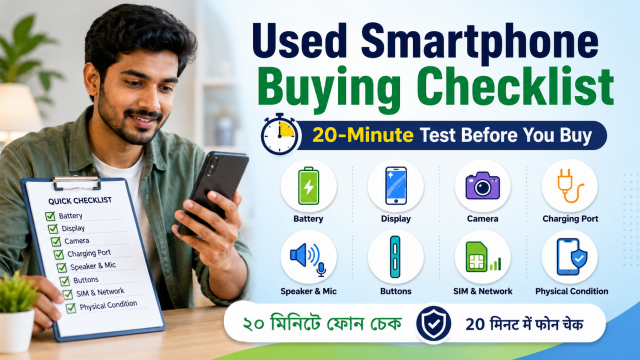
Quick answer: Do not pay after checking only that the phone turns on. Confirm that the seller can remove every account and device lock, then test the screen, touch, cameras, calls, speakers, microphones, charging, Wi-Fi, Bluetooth, buttons and battery behaviour.
Affiliate disclosure: Some links in this guide may be affiliate links. If you buy through them, JoLLy KA Tech may earn a commission at no extra cost to you. Recommendations should be based on compatibility, safety, warranty and value—not commission. As an Amazon Associate I earn from qualifying purchases.
Before meeting the seller
- Ask for the exact model name, storage size, purchase date, invoice, repair history and reason for sale.
- Ask whether the display, battery, camera, charging port or motherboard has been replaced.
- Request clear photos of the front, back, sides and charging port.
- Agree that payment will happen only after a complete test and account removal.
- Avoid advance payment merely to reserve a common model.
The 20-minute used-phone test
Minute 0–3: Check ownership and account locks
The seller should unlock the phone normally and show that it is not controlled by a company, school or finance-lock application. On an iPhone, the seller must turn off Find My and remove the device from the seller’s Apple Account. On Android, the seller should remove Google accounts before a factory reset so the next owner is not blocked by device protection.
Walk away if the seller says an account lock can be removed later, asks you to bypass it, or cannot explain why the phone is linked to another person.
Minute 3–6: Inspect the body and water-warning signs
- Look for a bent frame, cracked camera glass, loose back panel and missing screws.
- Check whether the charging port is loose or filled with corrosion.
- Press gently around the display edge; it should not lift from the frame.
- Look for unusual gaps that may suggest a swollen battery.
- Do not rely on a new case or screen protector to hide damage.
Minute 6–9: Test the display and touch
- Set brightness low, then high.
- Open a white image and look for dark spots, lines or yellow patches.
- Open a dark image and look for bright stuck pixels or severe unevenness.
- Drag an icon slowly around every edge and corner to test touch response.
- Type every letter and number on the keyboard.
Minute 9–12: Test cameras, speakers and microphones
Take photos with every rear camera and the front camera. Record a short video while speaking, then play it back. Test the earpiece during a call, the loudspeaker, vibration and the proximity sensor that turns the screen off near your face.
Minute 12–15: Test network and connections
- Insert your own SIM only with permission and make a call.
- Test mobile data, Wi-Fi and Bluetooth.
- Connect a known charger and check whether charging starts reliably.
- Test fingerprint and face unlock after the seller removes their biometric data.
- Check GPS using a map in an open area if location use matters to you.
Minute 15–18: Confirm real storage and software status
Open the phone’s About and Storage pages. Confirm the model, storage size and software version. Check whether the device still receives security updates from its manufacturer. A phone that works today can still be a poor value if important banking or work apps will soon stop supporting it.
Minute 18–20: Restart, reset and set up
Restart the phone before payment. If you decide to buy, the seller should remove all accounts and perform the reset from the normal Settings menu. Begin setup far enough to confirm that the phone does not request the previous owner’s credentials.
Battery health: what a short test can and cannot prove
A 20-minute meeting cannot prove full-day battery life. Watch for rapid percentage drops, unexpected shutdowns, swelling, excessive heat and charging interruptions. On phones that display battery-health information, treat it as one clue rather than a guarantee.
| Seller claim | What you can verify | What remains uncertain |
|---|---|---|
| “Battery lasts all day” | Short discharge and charging behaviour | A full day of mixed use |
| “Never repaired” | Visible gaps, software notices and invoice | Hidden component-level work |
| “Original display” | Colour, brightness, touch and repair notices | Full part history on every model |
| “Waterproof” | Nothing reliable in a used-phone meeting | Water resistance after age or repair |
Reasons to walk away
- The phone is still linked to another person’s Apple or Google account.
- The seller refuses a reset or basic test.
- The serial or IMEI area looks altered, or the invoice does not match.
- The frame is bent, the back is lifting, or the battery appears swollen.
- Calls, touch, charging or cameras fail intermittently.
- The price is unusually low and the seller pressures you to pay immediately.
Used, renewed and refurbished are not the same
Used usually means sold in its present condition. Refurbished or renewed should mean inspected and repaired, but the testing standard, replacement parts and warranty vary by seller. Ask who performed the refurbishment, what was replaced and what the written return policy covers.
Frequently asked questions
Should I check the IMEI online?
You can compare the IMEI shown in Settings, on the device and on the invoice where applicable. Do not publish it. Use only legitimate official or carrier-supported checks; an online result cannot replace proof of ownership.
Is a factory reset enough to make a phone safe to buy?
No. The reset must be completed after the previous owner removes account locks. You also need to test hardware, network functions and repair history.
Should I buy a phone with a replaced battery?
It can be reasonable when the work was done properly with a suitable part and written warranty. Ask for the repair invoice and test charging, heat and fit.
Can I trust a waterproof rating on a used phone?
Do not assume the original water resistance remains after drops, age or repair. Treat every used phone as needing normal protection from liquids.