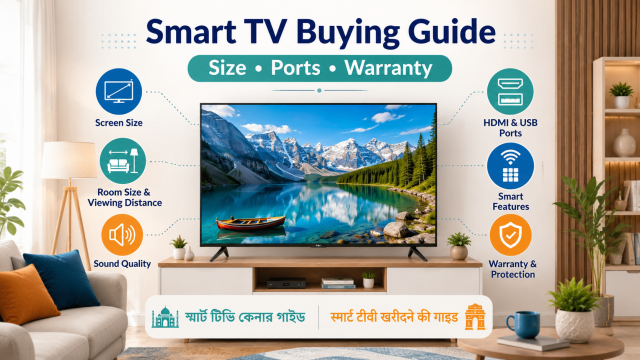
Quick answer: Start with your seating distance and available wall or table space. Then choose the picture quality, operating system, number of HDMI and USB ports, sound connection, warranty and local service. Do not buy only because the box says “AI,” “HDR” or “bezel-less.”
Affiliate disclosure: Some links in this guide may be affiliate links. If you buy through them, JoLLy KA Tech may earn a commission at no extra cost to you. Recommendations should be based on compatibility, safety, warranty and value—not commission. As an Amazon Associate I earn from qualifying purchases.
Step 1: Measure the room before comparing models
- Measure the distance from the normal seating position to the screen.
- Measure the width and height available on the wall or TV table.
- Check whether doors, windows or cupboards will hit the screen.
- Decide whether the TV will stand on feet or use a wall mount.
- Leave space for ventilation, cables and a future soundbar.
A manufacturer viewing-distance formula can be a useful starting point, but comfort also depends on eyesight, content quality and personal preference. Mark the proposed screen size on the wall with removable tape or cardboard before ordering.
Step 2: Choose resolution by screen size and content
| Use | Practical priority | Do not assume |
|---|---|---|
| News, serials and normal set-top box | Good upscaling, motion and viewing angles | A 4K label will improve every low-quality channel |
| Streaming films and YouTube | 4K support, stable apps, useful HDR performance | Every HDR logo gives the same result |
| Gaming console | Low input delay, suitable refresh features and correct HDMI port | All HDMI ports support every gaming feature |
| Family viewing from the side | Wide viewing angles and low reflection | The showroom demo matches your bright room |
Step 3: Count the ports you will actually use
List every device: set-top box, streaming stick, soundbar, game console, laptop and USB drive. Buy enough ports for today’s devices plus one spare when possible.
- HDMI: Used for set-top boxes, consoles, streaming devices and soundbars.
- HDMI ARC/eARC: Sends TV audio to a compatible soundbar or receiver.
- USB: May play media or power small devices, but support varies.
- Ethernet: Useful when Wi-Fi is weak or crowded.
- Optical audio: Helpful for some older sound systems.
- Headphone or analogue audio: Not included on every modern TV.
Step 4: Check the operating system and app support
A smart TV is also a software device. Check whether the apps you use are officially available in India on that exact model and whether the remote is comfortable for older family members. Ask how long the manufacturer provides software and security updates, while understanding that app support can change.
Step 5: Judge picture quality with normal content
- Ask to switch off showroom or vivid mode.
- Watch a normal TV channel, a dark scene and a sports clip.
- Stand at your normal viewing angle, not only directly in front.
- Look for distracting reflections in bright scenes.
- Check subtitles and small text from your expected seating distance.
- Do not compare two TVs showing different demo videos.
Step 6: Do not ignore sound
Thin televisions have limited space for speakers. Dialogue clarity may matter more than maximum loudness. Test speech at a normal volume. A soundbar can help, but first check whether the TV has ARC/eARC or another compatible output.
Step 7: Compare service, installation and warranty
- Confirm whether installation and wall mounting are included or charged separately.
- Ask who supplies the wall mount and whether using another mount affects service.
- Check the written panel and product warranty, not only a salesperson’s statement.
- Confirm service availability in your PIN code.
- Inspect the delivery box and screen before acknowledging damage-free delivery where possible.
Features that are useful only for some buyers
| Feature | Useful when | May not matter when |
|---|---|---|
| 120Hz-class gaming features | You own a compatible console or gaming PC | You mainly watch normal TV |
| Voice control | Family members use it and privacy settings are understood | You prefer simple buttons |
| Bluetooth audio | You use wireless headphones or speakers | A wired soundbar is always connected |
| Large internal storage | You install many apps | You use only a few streaming apps |
| Premium HDR formats | Panel brightness and content support are also good | The panel cannot show a meaningful difference |
Frequently asked questions
Is a bigger TV always better?
No. It must fit the room, viewing distance and content quality. A cardboard outline is a better guide than guessing from a showroom.
Do I need a separate streaming stick?
Not when the built-in software is fast and supports your apps. A streaming device can later extend the useful life of a TV whose built-in apps become slow or unsupported.
How many HDMI ports are enough?
Count your devices and add one spare where possible. Remember that a soundbar using ARC/eARC occupies an HDMI port.
Should I buy an extended warranty?
Read what it covers, exclusions, claim process and provider identity. Compare the price with the manufacturer’s standard coverage and local repair options.