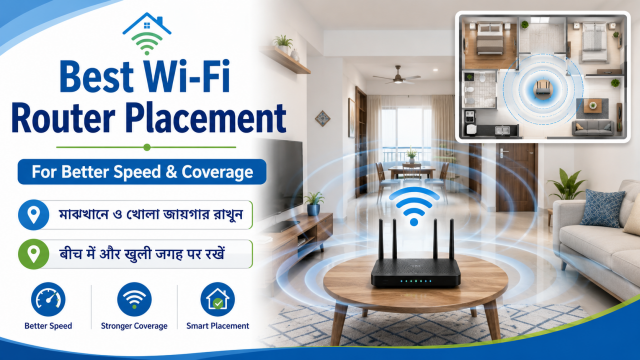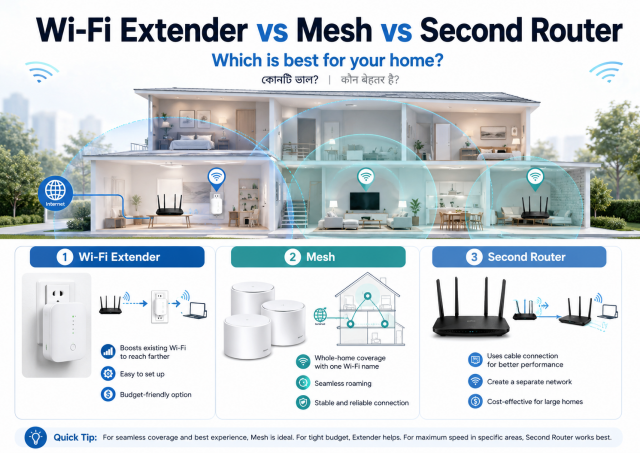
Quick answer: First move the existing router higher and more centrally. If one nearby room remains weak, an extender may be enough. For several rooms or multiple floors, a compatible mesh system is usually easier to manage. A wired access point or properly configured second router can provide strong performance when an Ethernet cable is available.
Affiliate disclosure: Some links in this guide may be affiliate links. If you buy through them, JoLLy KA Tech may earn a commission at no extra cost to you. Recommendations should be based on compatibility, safety, warranty and value—not commission. As an Amazon Associate I earn from qualifying purchases.
Do not buy anything until you run this test
- Test speed beside the main router.
- Test the room with the problem using the same phone.
- Move the router into the open and higher from the floor.
- Restart the router and test again at the same time of day.
- Check whether the internet itself is slow beside the router.
If speed is poor beside the router on every device, adding more Wi-Fi points may not solve the provider, modem or main-router problem.
The four common options
| Option | Best fit | Main limitation |
|---|---|---|
| Move the existing router | Poor placement or one central home | Cable and power location may limit movement |
| Wi-Fi extender/repeater | One modest dead zone and limited budget | Must receive a good signal; speed and roaming can be less smooth |
| Mesh system | Several rooms, large home or multiple floors | Higher cost and compatibility rules |
| Wired access point / second router in AP mode | Ethernet cable can reach the weak area | Needs cabling and correct setup |
Wi-Fi extender: simple but placement is critical
An extender cannot create a strong connection from a weak one. Place it between the main router and the dead zone, where it still receives a reliable signal. If it is placed inside the dead zone, it may repeat a slow or unstable connection.
Mesh Wi-Fi: easier movement between points
A mesh system uses a main router and additional compatible points as one managed network. It can improve coverage and device roaming, but the connection between mesh points still matters. Thick walls, long distances and poor point placement reduce performance.
Second router or access point: strong when wired
An Ethernet cable from the main router to an access point can provide a strong connection in a distant room. A spare router may offer an access-point mode. Avoid running two separate routers with conflicting settings unless you understand the network design.
Questions that decide the right solution
- Is the problem one room or the entire home?
- How many floors and thick walls are involved?
- Can you run an Ethernet cable?
- Do family members move around during calls?
- What internet speed do you pay for?
- How many phones, TVs, cameras and computers connect at once?
- Do you need simple app-based management or advanced settings?
Common mistakes
- Buying an extender before fixing bad router placement.
- Putting the extender in the weakest room.
- Mixing incompatible mesh generations or product families.
- Using the same network name on unrelated routers without correct configuration.
- Expecting a mesh system to increase the internet plan’s speed.
- Hiding every router or point inside a cupboard.
A simple final decision
| Your situation | Try first |
|---|---|
| Slow only behind one wall | Router relocation, then a correctly placed extender if needed |
| Weak in several rooms on one floor | Two-node mesh or wired access point |
| Weak upstairs and downstairs | Mesh with carefully placed points or wired access points |
| Gaming/work computer in one far room | Ethernet or wired access point |
| Slow everywhere, even beside router | Troubleshoot internet, modem and main router first |
Frequently asked questions
Does an extender cut speed in half?
Performance depends on design, bands, placement, interference and how the extender communicates with the router. Treat simple “half speed” claims as a rough warning, not a universal measurement.
Can I mix any mesh devices?
No. Compatibility varies by manufacturer and generation. Check the official compatibility list before adding a point.
Should the mesh point go in the dead zone?
Usually no. It needs a strong enough connection to the main router or another point. Place it partway toward the problem area and run the system’s mesh test where available.
Can a second router use the same Wi-Fi name?
It can in a correctly designed access-point setup, but wrong DHCP, channel or routing settings can cause problems. Use access-point mode or professional help when uncertain.