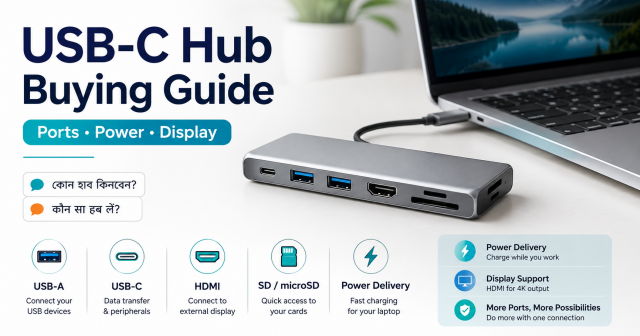
Quick answer: List the ports you need, then confirm what the laptop’s USB-C port can actually do. A hub cannot add video output if the host port does not support a compatible display mode, and power-delivery pass-through does not guarantee the laptop receives the charger’s full wattage.
Affiliate disclosure: Some links in this guide may be affiliate links. If you buy through them, JoLLy KA Tech may earn a commission at no extra cost to you. Recommendations should be based on compatibility, safety, warranty and value—not commission. As an Amazon Associate I earn from qualifying purchases.
Why USB-C compatibility is confusing
USB-C describes the connector shape. Depending on the device, the port may support basic USB data, faster data, charging, DisplayPort video, USB4, Thunderbolt or a combination. Two identical-looking ports on two laptops can behave differently.
Start with a port list
| Need | Port to look for | Important detail |
|---|---|---|
| Mouse, keyboard, printer | USB-A | Check number of ports and shared speed |
| External SSD | Fast USB-A or USB-C data | Check advertised data rate, not connector alone |
| Monitor or TV | HDMI or DisplayPort | Laptop must support compatible video output over USB-C |
| Wired internet | Ethernet | Check supported network speed and driver support |
| Camera memory card | SD/microSD reader | Check card size and speed needs |
| Charge laptop through hub | USB-C PD input/pass-through | Check hub limit, charger wattage and laptop requirement |
Display output: check the host first
Many hubs use DisplayPort Alt Mode carried through USB-C to create HDMI or DisplayPort output. The laptop’s USB-C port must support that display function. A normal USB data port cannot be converted into native video merely by adding a passive hub.
Power-delivery pass-through has losses and limits
If a hub accepts a USB-C charger, part of the power may be used by the hub and connected devices. The laptop can receive less than the charger’s label. Check the hub’s maximum input and output, the laptop’s requirement and the charger’s power table.
One hub shares bandwidth
An external SSD, card reader, Ethernet adapter and display can share the connection to the laptop. A product can have many ports without providing maximum performance to all of them at the same time. Look for realistic simultaneous-use information.
Heat is normal to a point
A metal hub may feel warm while moving data, driving a display or passing power. Stop using it if there is an unusual smell, swelling, cracking, repeated disconnection or heat that continues to rise uncomfortably. Keep it uncovered and avoid tension on the laptop port.
Cable design affects daily use
- A very short fixed cable may hang from a raised laptop stand.
- A long unsupported hub can pull on the port.
- Right-angle connectors may block another port.
- A thick laptop case can prevent full insertion.
- Detachable cables are replaceable but add another compatibility point.
Do you need a hub or a full dock?
| Choose | When it fits |
|---|---|
| Small travel hub | A few ports for occasional use and easy carrying |
| Powered desktop hub | Several USB accessories that need stable power |
| USB-C dock | One-cable desk setup with monitor, Ethernet and charging |
| Thunderbolt/USB4 dock | Your laptop supports it and you need higher-end display or storage capability |
First-day test checklist
- Update the laptop and manufacturer drivers.
- Connect the hub without important storage first.
- Test each port individually.
- Test the monitor at the intended resolution and refresh rate.
- Connect the charger and check whether the laptop reports normal charging.
- Copy a non-critical large file to test storage stability.
- Then test the combination you will use every day.
Frequently asked questions
Why does HDMI work on one laptop but not another?
The first laptop’s USB-C port may support DisplayPort Alt Mode, USB4 or Thunderbolt while the other supports only USB data.
Can a 100W hub charge a 100W laptop fully?
Not necessarily. The hub may reserve power, and its pass-through output can be lower than input. Check the hub and laptop specifications.
Will a hub slow my external SSD?
It can if the hub, cable or host connection has a lower data rate or shares bandwidth with other devices.
Do I need a powered USB hub?
A powered hub can help when several accessories need more power than the laptop port should supply. It does not fix an unsupported display mode.