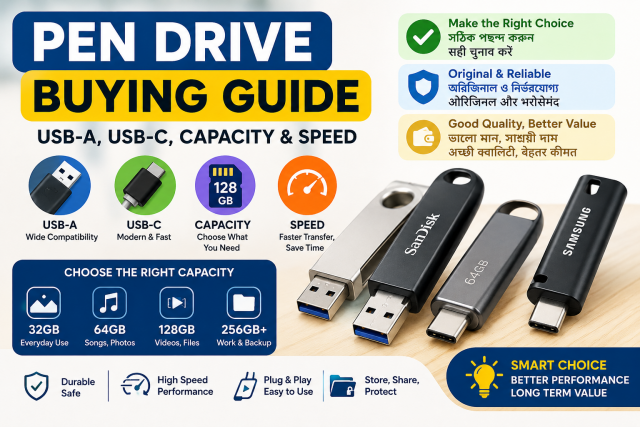
Quick answer: Choose the connector for your devices, enough capacity for your real files, and a drive with clear read and write performance from a reliable seller. A “USB 3” label or blue connector does not guarantee fast writing, and the usable capacity shown by a computer will normally be lower than the number on the package.
Affiliate disclosure: Some links in this guide may be affiliate links. If you buy through them, JoLLy KA Tech may earn a commission at no extra cost to you. Recommendations should be based on compatibility, safety, warranty and value—not commission. As an Amazon Associate I earn from qualifying purchases.
Choose the connector first
| Drive type | Useful for | Check before buying |
|---|---|---|
| USB-A | Older and many current computers, TVs and car stereos | Whether your phone needs an adapter |
| USB-C | Modern phones, tablets and laptops | Phone supports USB storage/OTG and the case leaves enough space |
| Dual USB-A + USB-C | Moving files between phone and computer | Both connectors have suitable speed and a strong cover |
| Lightning + USB | Some older Apple devices | Current iPhone/iPad compatibility, app requirement and certification |
Why a 128GB drive does not show exactly 128GB
Storage manufacturers and operating systems may calculate capacity using different units, and formatting or system structures use some space. A modest difference is normal. A very large difference, repeated corruption or files that disappear after a certain point can indicate a formatting problem, device limit or fraudulent product.
Read speed and write speed are different
Read speed affects how quickly you open or copy files from the drive. Write speed affects how quickly you save files to it. A listing may advertise only the higher read figure. Ask for both and look for tests of the exact capacity because performance can vary within one product family.
One large file versus many small files
Copying one large video is usually easier for a drive than copying thousands of small photos and documents. A realistic review should test both. Do not advertise the fastest moment shown by a progress bar as a stable average.
File system can limit file size and compatibility
- Some formats work with many older TVs and car stereos but cannot store a single very large file.
- Other formats support large files but may not work with every older device.
- Formatting erases the drive, so back up first.
- Format for the devices you will actually use, following their manuals.
- A smart TV or recorder may support only certain capacities and formats.
Phone use: check OTG and power
A USB-C connector does not guarantee that every phone supports external storage. Check the phone manufacturer’s support information. Remove thick cases if they prevent full insertion, and safely eject the drive before unplugging when the system offers that option.
How to avoid suspicious products
- Avoid prices far below normal for the claimed capacity.
- Check the exact seller and warranty provider.
- Do not trust reviews that refer to a different capacity or model.
- Test the full drive soon after delivery using reputable tools and real file copies.
- Keep the invoice and packaging.
- Never use a new untested drive as the only copy of important data.
A pen drive is not a backup by itself
Flash drives are easy to lose and can fail without warning. Keep important documents in at least one additional independent location, such as a computer plus a trusted backup service or another storage device.
Frequently asked questions
Does USB 3.x guarantee high speed?
It describes interface capability, not the flash memory’s sustained writing performance. The drive, host port, files and temperature all affect results.
Why does copying start fast and then slow down?
Some drives use a fast temporary cache. After it fills, sustained writing can be slower. Heat and many small files can also reduce speed.
Can I leave a pen drive connected to my phone all day?
It can use power and is easy to bump. Copy the files you need, eject it safely and store it protected.
Should I buy the largest capacity available?
Buy enough for your use and confirm every target device supports it. For critical data, two smaller independent copies can be safer than one very large drive.