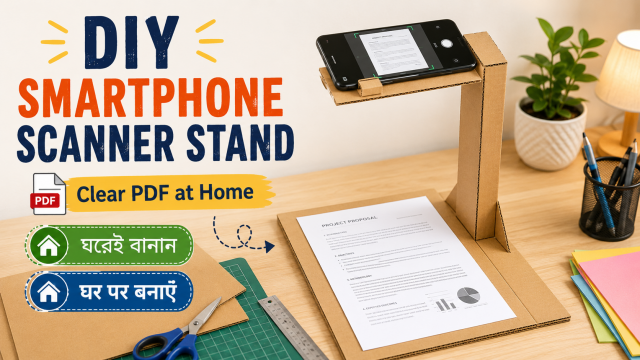
Quick answer: Place the phone directly above a flat document, keep the camera parallel to the page, use even light from both sides, and leave enough space to frame the full sheet. A simple stand made from boxes or books can improve consistency, but private documents still require careful storage and sharing.
Affiliate disclosure: This article may contain affiliate links. If you buy through them, JoLLy KA Tech may earn a commission at no extra cost to you. Product suggestions are based on suitability, safety, warranty and value—not commission. As an Amazon Associate I earn from qualifying purchases.
সহজ কথায়: ফোনটি কাগজের ঠিক ওপরে সমান্তরালভাবে রাখুন, দুই দিক থেকে সমান আলো দিন এবং সংবেদনশীল নথি শেয়ার করার আগে ব্যক্তিগত তথ্য যাচাই করুন।
आसान भाषा में: फोन को कागज के ठीक ऊपर समानांतर रखें, दोनों ओर से बराबर रोशनी दें और संवेदनशील दस्तावेज साझा करने से पहले निजी जानकारी जांचें।
Project time: 20–35 minutes • Difficulty: Beginner • Best for: Receipts, study notes, bills and household records
What you are building
This is a removable overhead support made from two equal stacks of books or sturdy boxes, a rigid bridge, and a phone holder or anti-slip cradle. It helps you repeat the same camera position for several pages. It is not a legal certification tool, and it does not guarantee that a scan will be accepted by a bank, government office, school or court.
Materials
- Two stable stacks of books or two strong boxes of equal height
- A rigid board, tray or thick cardboard bridge wider than the document
- A phone stand, clamp designed for phones, or a taped cardboard cradle
- A plain dark or light background that contrasts with the paper
- Two desk lamps or bright room light
- Optional: a remote shutter or camera timer to avoid shaking
Never balance a phone loosely above an original certificate, glass surface or valuable document. Test the support over an empty sheet first.
Build the overhead support
- Place the two book or box stacks on a stable table with space for an A4 sheet between them.
- Lay the rigid bridge across the stacks. Push gently from each side to confirm that it cannot slide.
- Attach the phone holder at the centre so the rear camera points straight down. Keep buttons and the camera lens unobstructed.
- Place an empty sheet below and open the camera or scanning app. Adjust height until all page edges are visible.
- Mark the four paper corners on the background with removable tape. This creates a repeatable alignment area.
- Move lights to the left and right at similar angles. Avoid a lamp directly behind the phone because it may create a phone-shaped shadow.
How to get a clearer scan
- Wipe the camera lens with a clean microfiber cloth.
- Flatten folded pages under a clean book for a few minutes before scanning.
- Keep the camera parallel to the paper; a tilted camera makes one side look wider.
- Use the app’s document mode rather than a normal beauty or portrait filter.
- Check small print at 100% zoom before scanning the next page.
- Retake pages with glare, missing corners or motion blur.
Choose PDF or image
PDF is usually convenient for multi-page documents and printing. JPG can be useful when you need a single page as an image. Google Drive supports scanning documents and saving them as PDF or JPG on supported mobile devices. App options and menu names can change.
Privacy checklist before saving or sharing
- Confirm the correct cloud account is signed in.
- Use a clear file name without exposing more personal information than necessary.
- Crop out unrelated documents visible around the page.
- Do not upload identity documents to an unknown “free scanner” website.
- Review sharing permissions; “anyone with the link” may be broader than intended.
- Delete rejected or duplicate scans from both the app and its trash when appropriate.
A simple file-naming system
Use a neutral pattern such as 2026-07-electricity-bill-home.pdf or school-receipt-2026-07.pdf. Avoid putting full identity numbers, passwords or bank details in filenames because filenames may appear in notifications, recent-file lists and shared folders.
Affiliate-friendly product ideas
Relevant products include a stable overhead phone holder, adjustable desk lamps, a non-glare document mat, a Bluetooth shutter and a compact file box. Explain that most people can test the method with books and existing lamps before buying anything.
Quality check before you depend on the scan
- Open every page.
- Zoom into names, dates, signatures and reference numbers.
- Check page order and orientation.
- Confirm the file opens on a second device when possible.
- Keep the original document when it is legally or practically important.
Frequently asked questions
Can I scan documents without a special app?
A normal camera can capture a page, but a document-scanning feature usually helps with edge detection, perspective correction and multi-page PDF creation.
Should I use flash?
Flash often creates glare on glossy paper. Even light from two sides is usually easier to control. Test both methods on a non-sensitive page.
Is a phone scan equal to a photocopy?
Not always. Acceptance depends on the organisation and purpose. Ask for the required format, resolution, colour and certification before submitting an important document.
How do I scan a bound book?
Do not force the spine flat. Support the open pages gently, scan one page at a time and correct perspective carefully. Respect copyright and usage rights.
Sources and further reading
Important: Device designs, app menus and manufacturer instructions can change. Check the manual for your exact device before using cleaners, stands, chargers, storage products or accessories.