Quick answer: Use an open tray, keep every charger visible and ventilated, separate unused cables from active charging cables, and label both ends. Never cut, splice, repair or hide mains wiring as part of a decorative DIY project.
Affiliate disclosure: This article may contain affiliate links. If you buy through them, JoLLy KA Tech may earn a commission at no extra cost to you. Product suggestions are based on suitability, safety, warranty and value—not commission. As an Amazon Associate I earn from qualifying purchases.
সহজ কথায়: চার্জার ঢেকে না রেখে খোলা ট্রেতে রাখুন, কেবলের দুই প্রান্তে লেবেল দিন এবং ক্ষতিগ্রস্ত তার ব্যবহার করবেন না।
आसान भाषा में: चार्जर को बंद डिब्बे में न छिपाएं, खुले ट्रे में रखें, केबल के दोनों सिरों पर लेबल लगाएं और खराब तार का उपयोग न करें।
Project time: 25–40 minutes • Difficulty: Beginner • Best for: Family charging areas, work desks and bedside tables
The safety-first design
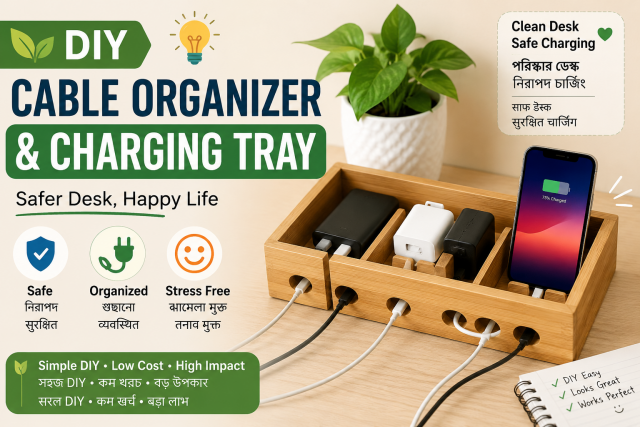
The goal is organisation, not electrical modification. The tray holds phones and loose low-voltage cable sections while certified chargers and power strips remain uncovered, dry and easy to inspect. A closed “charging box” may look tidy but can trap heat and hide damaged plugs.
Materials
- A shallow open tray made of plastic, metal mesh or sturdy cardboard
- Reusable hook-and-loop cable ties
- Removable labels or masking tape and a permanent marker
- Adhesive cable clips designed for the desk surface
- Optional rubber feet or a non-slip mat
- A certified power strip only if you already need one; do not overload it
Stop using any cable, charger or power strip that is cracked, wet, swollen, sparking, loose, discoloured or producing an unusual smell. Do not open a sealed power adapter yourself.
Sort before you organise
- Unplug devices safely and place every cable on the table.
- Group by connector: USB-C, Lightning, Micro-USB, laptop barrel connector and other types.
- Separate charging-only cables from cables you know support data or video.
- Remove cables with damaged insulation, bent plugs or loose connectors from normal use.
- Keep one or two frequently used cables at the station and store duplicates elsewhere.
Label both ends
A label near the device end can say “MOTHER PHONE,” “TABLET,” “65W LAPTOP” or “DATA CABLE.” Add a matching label near the charger end. Avoid writing a wattage unless you verified the charger and cable rating; a USB-C shape alone does not prove charging capability.
Build the open tray
- Place the tray away from water, cooking areas, direct sun, bedding and curtains.
- Add a non-slip base so it does not move when a cable is pulled gently.
- Fix cable clips to the desk edge, not to a hot adapter or a device ventilation opening.
- Route each cable in a wide curve. Tight bends near the connector can weaken it.
- Keep chargers and the power strip outside or beside the tray where air can circulate.
- Leave empty space between charging devices rather than stacking phones or power banks.
Make one “return point” for every cable
Use a labelled clip or small divider for each everyday cable. The family rule is simple: disconnect from the device by holding the plug, then return the cable to its marked position. This reduces searching and unnecessary pulling.
What not to put in the tray
- Loose coins, keys or metal tools
- Wet wipes, drinks or liquid cleaners
- A hot power bank immediately after heavy use
- Damaged batteries or swollen devices
- A mains extension joint wrapped in tape
- Paper covering an active charger or wireless charging pad
Natural affiliate opportunities
Suitable recommendations include reusable hook-and-loop ties, cable clips, a label maker, a mesh desk tray, a certified surge protector and short cables in verified ratings. Avoid “miracle” accessories, fake certification claims and products that encourage hiding active chargers in closed boxes.
Monthly two-minute check
- Feel for unusual heat during normal supervised use.
- Check plugs for looseness and cable jackets for cracks.
- Remove dust with power disconnected.
- Confirm labels still match the devices.
- Retire unnecessary or damaged accessories responsibly.
Frequently asked questions
Can I keep chargers inside a cardboard cable box?
It is safer to keep active chargers visible and ventilated. If a commercial organiser is used, follow its instructions and do not block charger or device ventilation.
Are cable ties safe?
Reusable hook-and-loop ties are useful when they are not pulled tight. Avoid sharp plastic ties near flexible connector joints.
Can one charger power every device?
Only when each device, charger, port and cable support compatible charging requirements. Connector shape alone is not enough.
Should I leave the power strip on all night?
Follow the device and power-strip instructions. Do not charge damaged devices, cover charging equipment or leave a setup unattended when you have noticed unusual heat or electrical faults.
Sources and further reading
- Apple: Important safety information for iPhone
- JoLLy KA Tech: USB-C cable buying guide
- JoLLy KA Tech: Phone charger heating guide
Important: Device designs, app menus and manufacturer instructions can change. Check the manual for your exact device before using cleaners, stands, chargers, storage products or accessories.