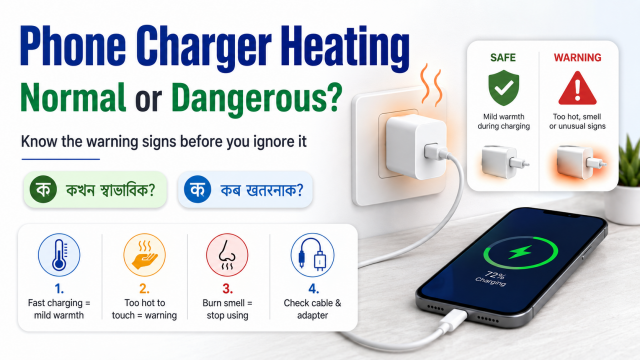
Quick answer: A charger may feel warm during normal or fast charging. Stop using it and unplug it safely if there is smoke, a burning smell, sparks, swelling, cracking, discoloration, liquid damage, a loose plug or heat that feels uncomfortable or continues to increase.
Affiliate disclosure: Some links in this guide may be paid affiliate links.
If you buy through them, JoLLy KA Tech may earn a commission at no extra cost to you.
Recommendations should be based on suitability, safety, warranty and value—not commission.
As an Amazon Associate I earn from qualifying purchases.
Why chargers become warm
A charger converts electricity from the wall into power the phone can use. Some energy becomes heat during that process. Fast charging, a low phone battery, a warm room, poor ventilation and heavy phone use can make the charger and phone feel warmer.
Manufacturers also explain that devices may slow or pause charging when temperature rises. Warmth alone is not proof of a fault, but visible damage or unusual heat should never be ignored.
Normal warmth versus warning signs
| Usually less concerning | Stop and inspect |
|---|---|
| Mild warmth during charging | Burning smell, smoke or sparks |
| Warmer during fast charging | Cracked, swollen or discoloured casing |
| Phone slows charging when warm | Loose pins, buzzing or repeated power cuts |
| Charger cools after unplugging | Heat keeps increasing or is uncomfortable to touch |
| Warm room or heavy phone use | Wet charger, wet cable or liquid warning |
Seven safe checks
- Unplug first: If anything feels unsafe, switch off the wall socket when possible and unplug the adapter.
- Let it cool: Place the phone and charger on a dry, hard, open surface. Do not put them in a refrigerator or use water.
- Check the cable: Look for cuts, exposed wire, bent connectors or a loose fit.
- Check the phone port: Look for visible dust or moisture. Do not insert metal objects.
- Use an open location: Do not cover the charger with clothing, bedding, a pillow or a bag.
- Reduce phone use: Stop gaming, hotspot use or long video calls while checking the problem.
- Test only with a known-compatible accessory: Follow the phone manufacturer’s charging guidance.
Common causes non-technical users can recognise
Damaged cable
A damaged connector or cable can cause slow charging, repeated connection and heat near the port. Replace the cable rather than bending it into a position that “works.”
Loose wall socket or adapter
A plug should not wobble or spark. Stop using a loose or damaged socket and ask a qualified electrician to inspect it.
Charger covered by bedding
A charger needs ventilation. Charging under a pillow, blanket or mattress can trap heat and is unsafe.
Heavy phone use while charging
Games, video recording, navigation and hotspot use make the phone work harder. The phone may charge more slowly or become warmer.
Incompatible or poor-quality accessory
A cable may fit physically but still be unsuitable. Prefer accessories with clear specifications, warranty and support from a reputable manufacturer.
When should you replace the charger?
Replace it when the casing, pins, cable or connector is damaged; when it repeatedly disconnects; when it gives off an unusual smell; or when the manufacturer or service centre advises replacement. Do not open or repair a sealed charger yourself.
How to recommend a charger responsibly
- Name the exact phone models or charging standards checked.
- State the charger’s output specifications clearly.
- Separate “compatible” from “maximum charging speed.”
- Explain whether a cable is included.
- Compare warranty and seller support.
- Never promise that a third-party charger will improve battery health.
Frequently asked questions
Is fast charging bad because it creates heat?
Compatible phones manage charging and may reduce speed when temperature rises. Use compatible accessories, keep the phone ventilated and follow the manufacturer’s guidance.
Why does charging stop at 80%?
Some phones use battery protection settings or temporarily limit charging because of temperature. Check the phone’s battery settings and on-screen message.
Can I continue using a charger that sparks once?
No. Unplug it safely and inspect the charger and socket. A qualified technician or electrician should check damaged electrical equipment.
Can I clean a charging port with a pin?
No. Metal tools can damage the port or create a short circuit. Follow the phone manufacturer’s cleaning instructions or use authorised service.